
Keyword Cannibalisation: How to Find Real Conflicts and Fix Them
Keyword cannibalisation (also spelled keyword cannibalization) is not simply two pages that use, target or rank for the same keyword.
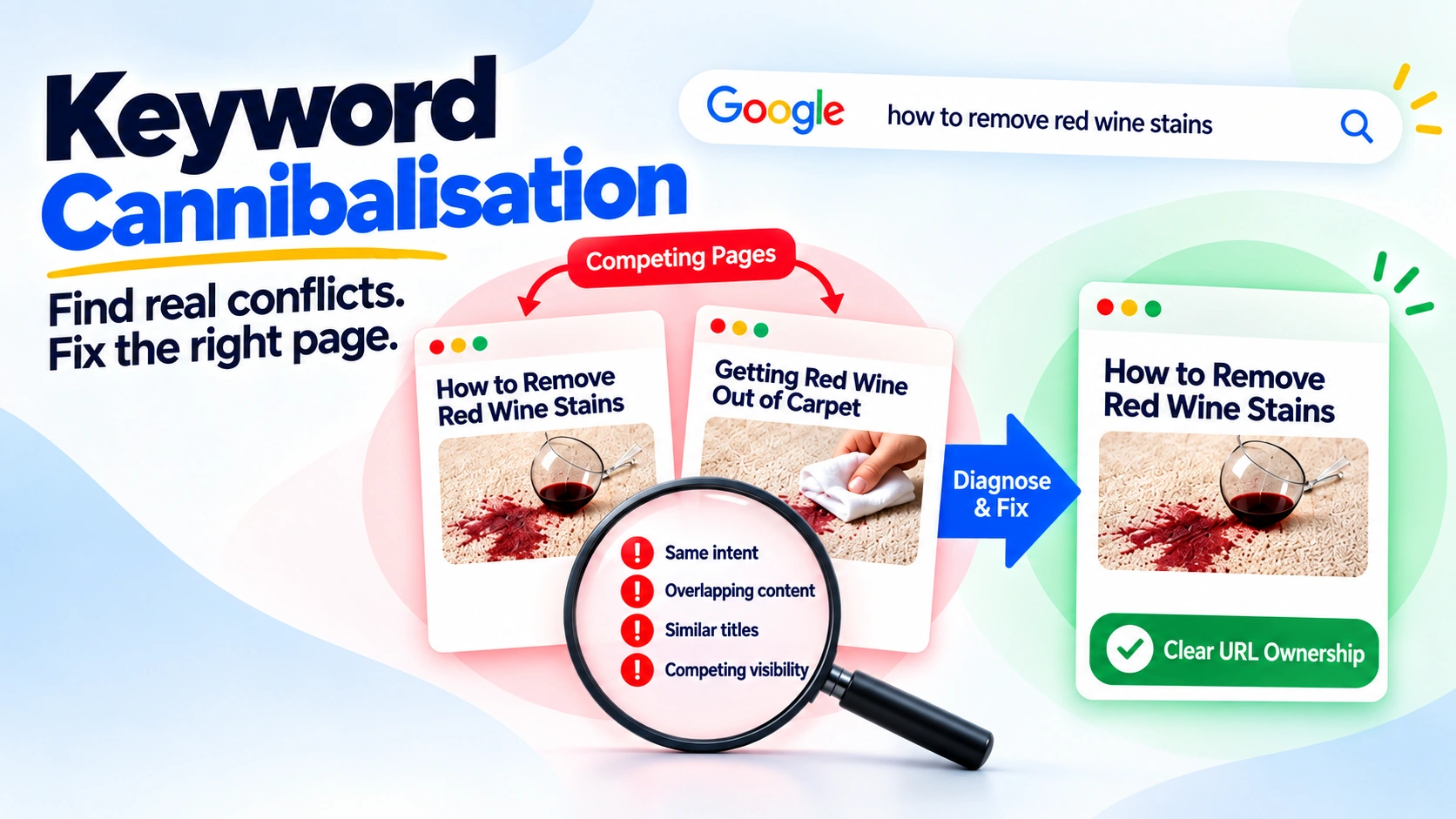
Keyword cannibalisation (also spelled keyword cannibalization) is not simply two pages that use, target or rank for the same keyword. That is a reason to look closer, nothing more. The real question is whether the pages serve substantially the same search purpose, and whether the evidence you have suggests the overlap is getting in the way of the right page performing.
This guide sets out a way to answer that question. You find candidates in Google Search Console, test them against five gates, decide which URL should own the search purpose, and then choose the smallest fix that solves the problem. Sometimes that fix is to do nothing.
A note on sources: where we describe how Search Console, canonicalisation, redirects, noindex or links work, we rely on Google’s documentation. The five-gate test and the decision table are Crafted Visibility’s own methodology. They are not a Google framework, and we label them as such.
What keyword cannibalisation actually means
Keyword cannibalisation is an SEO industry term for a situation where several URLs on one site overlap so much in purpose that it is unclear which one should serve a particular search need. As a diagnosis, it can be useful.
In the Google Search documentation reviewed for this article, we did not find “keyword cannibalisation” defined as a formal Search system or penalty.
What Google does document is the machinery that matters when you investigate. That includes how Search Console reports queries and pages, how Google groups duplicate or very similar pages and chooses a canonical, how redirects and noindex behave, and how links help Google find and understand pages. The rest of this article uses those documented mechanisms and adds a diagnostic method on top.
Keyword overlap is not the same as intent conflict
A page can appear for many queries. Two pages can share a lot of vocabulary, and can even appear for the same query. What matters is whether they are trying to do the same job for the same searcher.
A guide that explains how to do something and a page that sells a related service will often share terms. That overlap can reflect topical coherence rather than conflict. Two guides that answer the identical question for the identical reader are a different matter, because a searcher would be equally well served, or equally poorly served, by either.
So the working distinction is this: keyword overlap is about shared words and queries, while intent overlap is about shared purpose. The second is a much stronger reason to investigate potential cannibalisation.
When two URLs appearing for the same query is not a problem
Google’s guidance on title links mentions in passing that several pages from the same site can be returned for the same query. That observation does not tell us whether the overlap is healthy or harmful. It establishes only that multi-URL visibility can happen.
Three common situations where overlap may be legitimate:
Mixed intent. A broad query can be served by a commercial or category page and by an informational guide because different searchers may want different things.
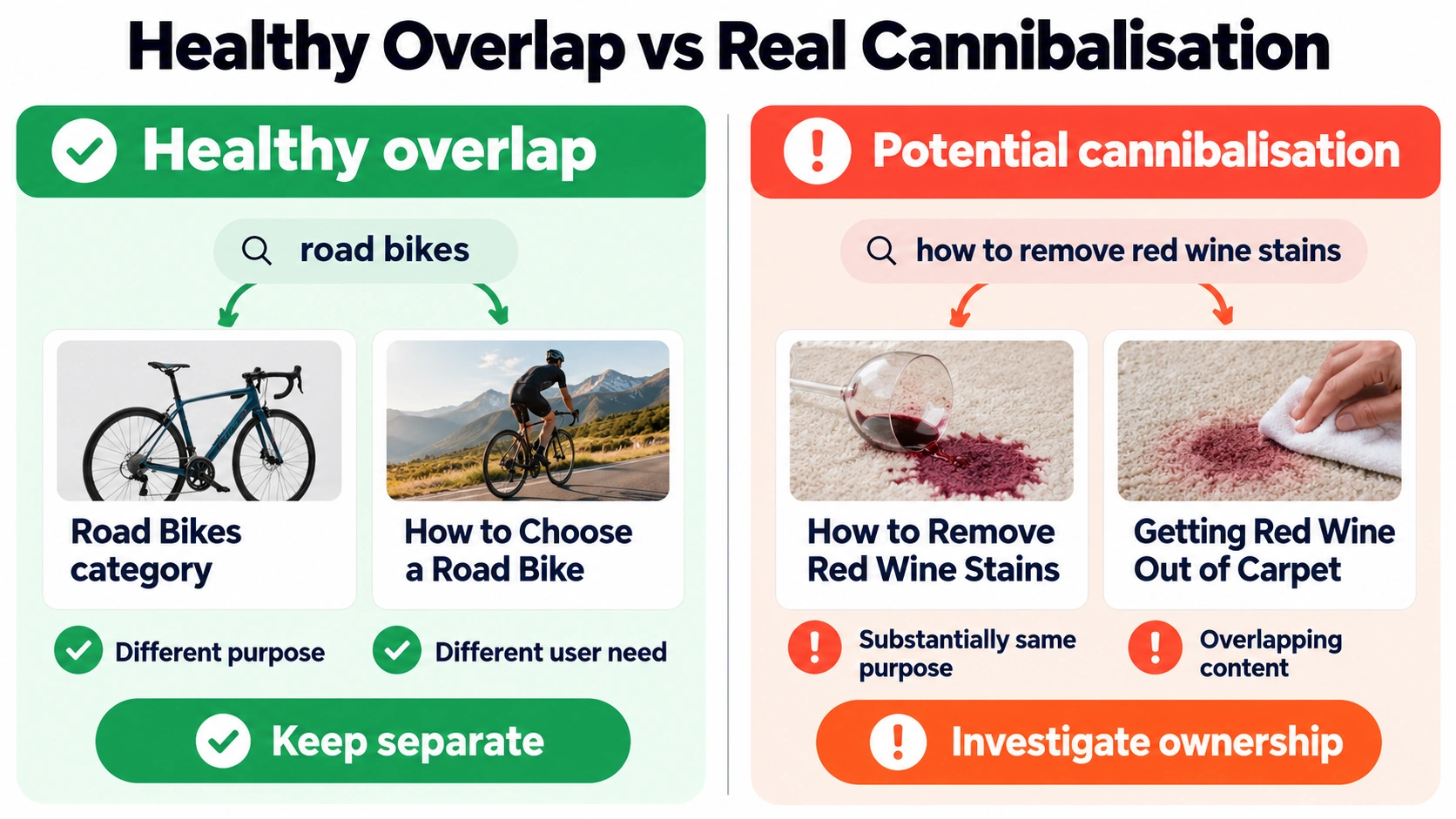
Hypothetical example. An online cycling retailer has a “road bikes” category page and a guide called “How to choose a road bike”. Both appear for the query “road bikes”. One helps people who are ready to browse products, while the other helps people who are still deciding what to look for. Each has a distinct job, so the shared query alone is not a reason to merge them.
Brand and navigation queries. A search that includes your brand name may reasonably surface several useful pages because the searcher’s exact destination is not always clear.
Stable complementary visibility. If two distinct pages consistently earn useful visibility for different user needs and the available evidence does not suggest meaningful interference, there is no reason to change them simply because both appear.
One caution: apparently healthy overlap does not prove that no problem exists. It means multi-URL visibility on its own is not enough evidence to act.
How to find cannibalisation candidates in Google Search Console
Google Search Console’s Performance report does not label a query/page relationship as “cannibalisation”. What it can do is show which URLs Google displayed for a given query, giving you a shortlist of candidates to investigate.
Google documents this workflow in its Performance report guidance.
- Open the Search results Performance report.
- Click the Queries tab and choose a query that matters. If you want to investigate a related query cluster, use an appropriate query filter or regular expression.
- For a single query, click that query to filter the report.
- Open the Pages tab to see which URLs were shown for the filtered query or query set.
- Compare useful time periods where appropriate so you can see whether the pattern is stable or changing.
- Note whether one URL or several keep surfacing, and how impressions and clicks are distributed between them.
Queries shown as rows are exact query strings, while Search Console’s filters and regular expressions can help group related searches. Google also recommends paying more attention to trends in impressions and clicks than to average position alone.
Treat the result as a shortlist. Three limitations in Google’s Search Console dimensions and data-grouping documentation matter here:
- Anonymised queries are omitted from the query table to protect user privacy.
- Data is truncated. Search Console shows only the most important rows, so not every non-anonymised query appears. Bulk data export provides the most complete query list available from Search Console.
- Most performance data is assigned to canonical URLs. If a user clicks a duplicate URL, the click is generally attributed to its canonical URL, while the Pages dimension groups data by the final URL after redirects.
The practical result is important: the absence of a conflicting query/page pair in the report does not prove that no overlap exists. The presence of one does not prove there is a problem.
What URL switching means, and what it does not prove
In this article, URL switching means the URL shown for a materially similar query or query cluster changing over time between two or more URLs on the same site.
For example, one guide might receive most impressions for a query during one period, another may become dominant later, and the first may subsequently return.
Repeated switching between pages that serve the same purpose can support a cannibalisation investigation. It does not establish causation by itself.
Google’s own Search Console guidance warns that performance changes can have several explanations. Changes in user interest, news events and competing sites can all affect results. Other possibilities to check include:
- a change in what searchers appear to want from the query;
- content updates to either page;
- canonical or redirect changes;
- seasonality;
- normal ranking movement.
Not every change in average position is URL switching, and ranking volatility by itself is not evidence of cannibalisation. Weekly or monthly views can help reduce day-to-day noise when you are looking for a sustained pattern.
What about site: searches and third-party tools?
Google’s documentation for the site: search operator says the results are not guaranteed to include every indexed URL. Google suggests using URL Inspection when a URL does not appear in a site: query and you need to investigate that URL more closely.
Third-party tools can also identify URLs that overlap on queries.
Neither a site: result nor an automated cannibalisation flag tells you whether two pages genuinely share the same search purpose. Treat those outputs as prompts to investigate the pages, not as verdicts.
Is this actually cannibalisation? The Crafted Visibility five-gate test
The test below is Crafted Visibility methodology, not a Google framework. Its purpose is to stop you moving straight from “two URLs appear for a query” to “fix it”.
Work through the gates in order.
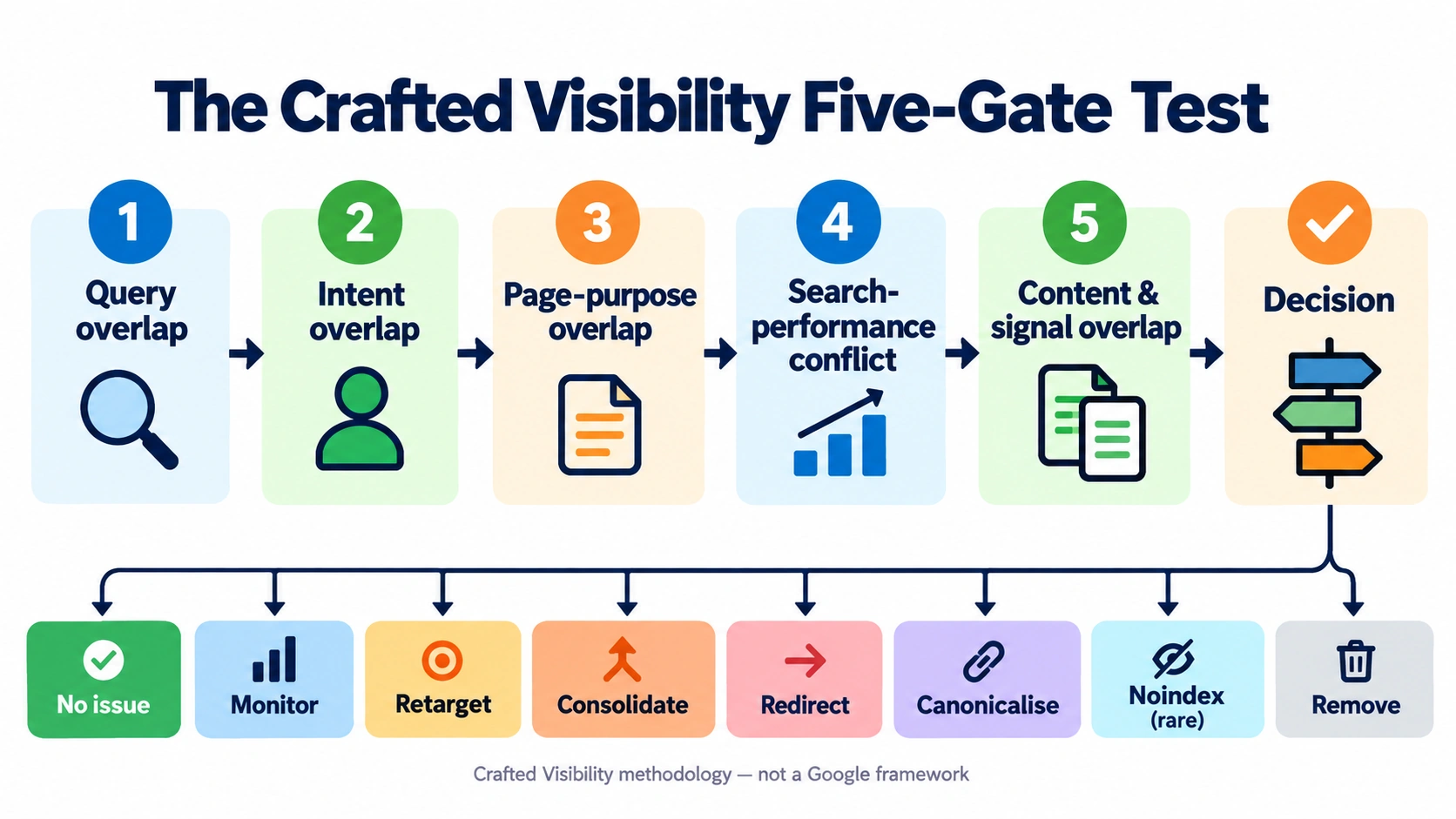
Gate 1: Query overlap
Are several URLs receiving meaningful visibility for the same query or a closely related cluster of queries?
If not, there is no issue from this query.
If they are, continue.
Gate 2: Intent overlap
Would substantially the same searcher be satisfied by either page, for the same reason?
Look at what kinds of results the query returns, what the dominant intent appears to be, what action the searcher is likely to take next, and whether the results for the queries each page is meant to serve look substantially similar.
Make the judgement by examining search intent and page purpose, not by counting shared words.
If the intents are genuinely different, the answer is usually KEEP SEPARATE.
Gate 3: Page-purpose overlap
Does each URL have its own job?
Legitimate pairings can include:
- a service page and a guide;
- a category page and a product page;
- a category page and a buying guide;
- an evergreen resource and a timely update;
- a brand page and a product page.
If the pages have genuinely different jobs but appear to blur together, the problem may be weak differentiation rather than duplicate purpose. That points towards clarifying each page’s role rather than merging them.
Gate 4: Search-performance conflict
Look for evidence that the overlap may be interfering with which page performs, such as:
- a less suitable URL repeatedly surfacing instead of the URL you would expect to serve the query;
- sustained switching between same-purpose URLs;
- clicks and impressions distributed across near-interchangeable pages;
- one page’s emergence coinciding with a decline in another;
- neither page establishing stable, useful visibility.
These patterns can support the diagnosis.
They do not prove causation.
Gate 5: Content and signal overlap
Finally, inspect the pages themselves and the signals around them:
- duplicated or near-duplicate sections;
- very similar titles and H1s;
- overlapping primary purpose;
- internal links and anchor text that point inconsistently at different URLs for the same need;
- canonical signals, redirects and indexing directives;
- whether one page is essentially an outdated version of another.
Only after working through these gates should you assign a treatment.
Which URL should own the intent?
Decide the owner before you choose the fix. The choice of technical mechanism should follow from the page-role decision, not replace it.
Consider six factors.
- Page purpose. Which URL most naturally fulfils the need represented by the query?
- Existing usefulness. Which page already contains the strongest genuinely helpful material? The page with the most traffic is not automatically the best owner.
- Search evidence. Which URL currently earns relevant impressions and clicks for the intended query cluster? Treat this as evidence rather than an automatic decision rule.
- Customer journey. Which URL best supports the sensible next step for the searcher? Do not turn an informational article into a service page simply because the service page converts better.
- URL stability. Where the other considerations are broadly equal, prefer a stable, durable URL and avoid unnecessary URL changes.
- Existing links and internal importance. Links can influence how you implement the decision, but they should not override search intent or page purpose. “Keep whichever page has the most backlinks” is not a reliable rule.
Cannibalisation decision table: what should you actually do?
This table is also Crafted Visibility methodology. It maps the diagnosis to the smallest justified intervention.
| Situation | Classification | Primary action |
|---|---|---|
| Same query, clearly different intent or purpose, useful coexistence | NO ISSUE | Keep separate |
| Some overlap but weak evidence of harm | MONITOR | Gather more evidence over a meaningful period |
| Both pages need to exist but serve their different purposes poorly | RETARGET | Clarify purpose, content and internal cues |
| Same purpose, useful material across both, only one URL is needed | CONSOLIDATE | Merge useful material and retire the redundant URL |
| Old or redundant URL has a genuine successor | REDIRECT | Permanently redirect to that successor |
| Duplicate or very similar variants must remain accessible | CANONICALISE | Use appropriate canonical signals |
| Page should remain accessible but intentionally stay out of Search | NOINDEX — RARE | Apply deliberate noindex |
| Obsolete URL has no useful replacement or reason to remain | REMOVE | Use the appropriate removal response |
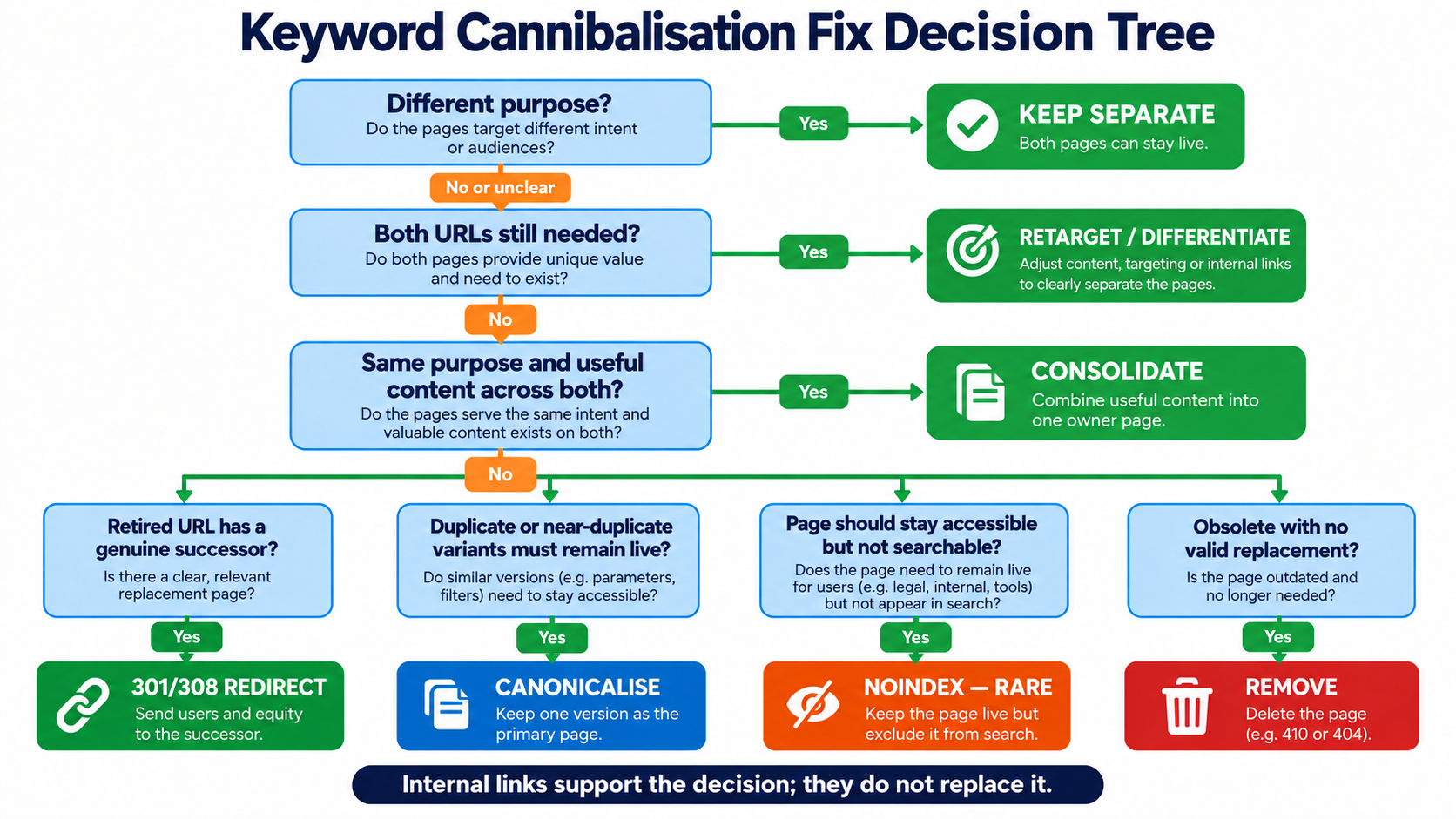
Internal-link cleanup supports several of these actions. It is not a substitute for deciding what each URL is supposed to do.
When to retarget instead of merge
Retargeting protects pages that both deserve to exist.
Hypothetical example. A landscaping company’s service page and a blog article have both drifted towards describing “garden design services”. The service page is meant for people ready to enquire. The article is meant for people still working out what garden design involves and what it might cost. Over time each has borrowed the other’s framing, and it is no longer obvious which page is for which searcher.
The fix here is not automatically to merge.
Instead:
- return the service page to the audience and problem it is meant to serve, with the decision to enquire clearly in view;
- refine the article’s title, H1 and opening emphasis so it remains the explanatory resource;
- remove sections that simply duplicate the other page rather than adding something useful;
- adjust supporting subtopics so the pages have clearer roles;
- update internal links and anchor text to reflect that relationship.
There is no keyword-density target to hit.
The goal is to make the distinction between the two page purposes clearer to searchers and search systems.
When consolidation and a permanent redirect make sense
Consolidation makes sense when two pages serve essentially the same purpose, both contain material worth keeping, there is no useful reason to maintain both URLs, and one can become the complete successor.
Hypothetical example. A site has two older guides: “How to remove red wine stains” and “Getting red wine out of carpet”. They answer effectively the same question for the same reader, repeat most of each other’s steps, and each contains one useful section the other lacks.
A sensible sequence is:
- Choose the surviving URL using the ownership criteria above.
- Merge genuinely useful material from the retiring page into the surviving one.
- Update internal links that still point to the retiring URL.
- Redirect the retired URL permanently to the genuine successor. Google’s redirect guidance documents permanent redirects as a signal that the redirect target should become canonical.
- Update the sitemap and relevant canonical references so they consistently point to the preferred URL. Google’s canonical URL guidance recommends using consistent canonical signals.
- Monitor Search Console after Google has had time to recrawl and reprocess the URLs.
Consolidation is a judgement call, not a default.
It does not come with a guaranteed ranking improvement, and it is the wrong fix when the pages serve meaningfully different intents.
Canonical vs noindex: two fixes commonly misused
Canonicalisation is for duplicate or very similar URLs
Google’s canonicalisation documentation explains that when it finds duplicate pages, or pages whose primary content is very similar, it can cluster them and select one representative canonical URL.
Google also says some duplicate content on a site is normal and is not inherently a violation of its spam policies.
You can indicate a preferred canonical using signals including redirects, rel="canonical" annotations and sitemap inclusion. Google’s guidance on specifying canonical URLs explains that canonical preference is a hint rather than a rule, so its systems may ultimately choose a different canonical.
Hypothetical example. A product listing is available at its normal URL and through another URL created by a sorting parameter. The underlying content is effectively the same. This is the type of duplicate or very similar URL situation canonical signals are designed to address. Managing those signals is part of canonical and redirect implementation on the technical side.
The distinction matters: a canonical signal tells Google which URL you prefer to represent duplicate or very similar content. It is not a general mechanism for choosing between two genuinely different pages merely because they appear for the same query.
noindex is not a generic cannibalisation fix
Google’s noindex documentation explains that a noindex rule instructs Google not to show a page in Search once Google can crawl the page and process the directive.
Google also makes an important implementation point: if the page is blocked from crawling, Google may not be able to see the noindex rule.
Its canonical guidance specifically says it does not recommend using noindex merely to prevent one page being selected as canonical within the same site, because noindex blocks the page from Search entirely.
Hypothetical example. A retailer creates a landing page used only for a paid advertising campaign. People reach it from the ads, it must remain accessible, and the business deliberately does not want it appearing in organic Search. That can be an appropriate reason to exclude the page from Search. Using
noindexon a useful guide simply because a service page also appears for the same query would solve a different problem: it would remove the guide from Search rather than clarify what each page is for.
Reserve noindex for cases where remaining accessible while being deliberately excluded from Search is the intended outcome.
Internal links: reinforce the ownership decision
Google’s link best-practices guidance says links help Google discover pages and can act as relevance signals. It recommends crawlable links with descriptive, relevant anchor text.
Google’s canonical guidance also recommends linking internally to the canonical URL rather than to a duplicate.
Once you have decided which URL owns an intent:
- update links that still point to retired pages;
- link, in context, to the page that genuinely answers the relevant need;
- use descriptive anchor text that reflects the destination;
- avoid creating inconsistent internal cues about which URL is primary.
Internal links reinforce a page-role decision.
If two pages still serve effectively the same purpose, changing their anchor text alone does not resolve that overlap.
Common cannibalisation mistakes
- Treating every repeated keyword as a problem.
- Treating every query with more than one URL as harmful.
- Merging pages that serve different intents.
- Treating URL switching as proof of cannibalisation.
- Treating ranking volatility as proof.
- Using
rel="canonical"on genuinely different pages. - Using
noindexas an easy way to pick a winner. - Redirecting a retired page to an irrelevant destination.
- Deleting a page without checking its wider query role.
- Trusting an automated tool’s label without reading the pages.
- Changing internal anchors while leaving two pages with the same purpose.
How to prevent cannibalisation before publishing
Prevention is mostly about deciding, before a new page goes live, what it is for.
- Maintain one clear URL owner for each materially shared search purpose.
- Check existing and planned URLs before approving a new page.
- Compare search intent and the makeup of the results, not just wording.
- Keep commercial or service pages protected from informational pages that would compete with them for the same purpose.
- Assign each page a primary theme and a set of supporting themes.
- Plan intentional internal relationships so related pages support rather than duplicate one another.
- Review query drift as content ages, because the queries and user needs associated with a page can change over time.
- Retarget or consolidate when two page purposes genuinely converge.
Notice that this is not the rule “one keyword, one page”.
Many queries and related terms can belong on one useful page, and the same broad query can legitimately surface pages with different jobs.
The rule is closer to:
one clear URL owner per materially shared search purpose.
When the issue needs a wider content or SEO audit
A single pair of overlapping pages can often be handled locally using the process above.
A pattern of many unclear or competing URLs can point to something larger:
- weak content architecture;
- publishing without a clear map of what already exists;
- an unclear hierarchy between service, category and guide pages;
- inconsistent internal linking;
- canonical or redirect problems;
- query drift across an ageing content library.
In those cases, fixing individual keywords one at a time is unlikely to solve the underlying architecture problem.
A structured content and intent review can establish clearer URL ownership, consolidation priorities and internal-link relationships.
Where the problem also spans technical and content priorities and it is unclear what should happen first, a wider SEO audit and strategy can help establish the order of work.
Neither guarantees a particular search outcome. The purpose is to replace guesswork about individual pages with a clearer understanding of what each URL is supposed to do.