
Why Your Google Business Profile Ranks in Your Town but Not Nearby Towns
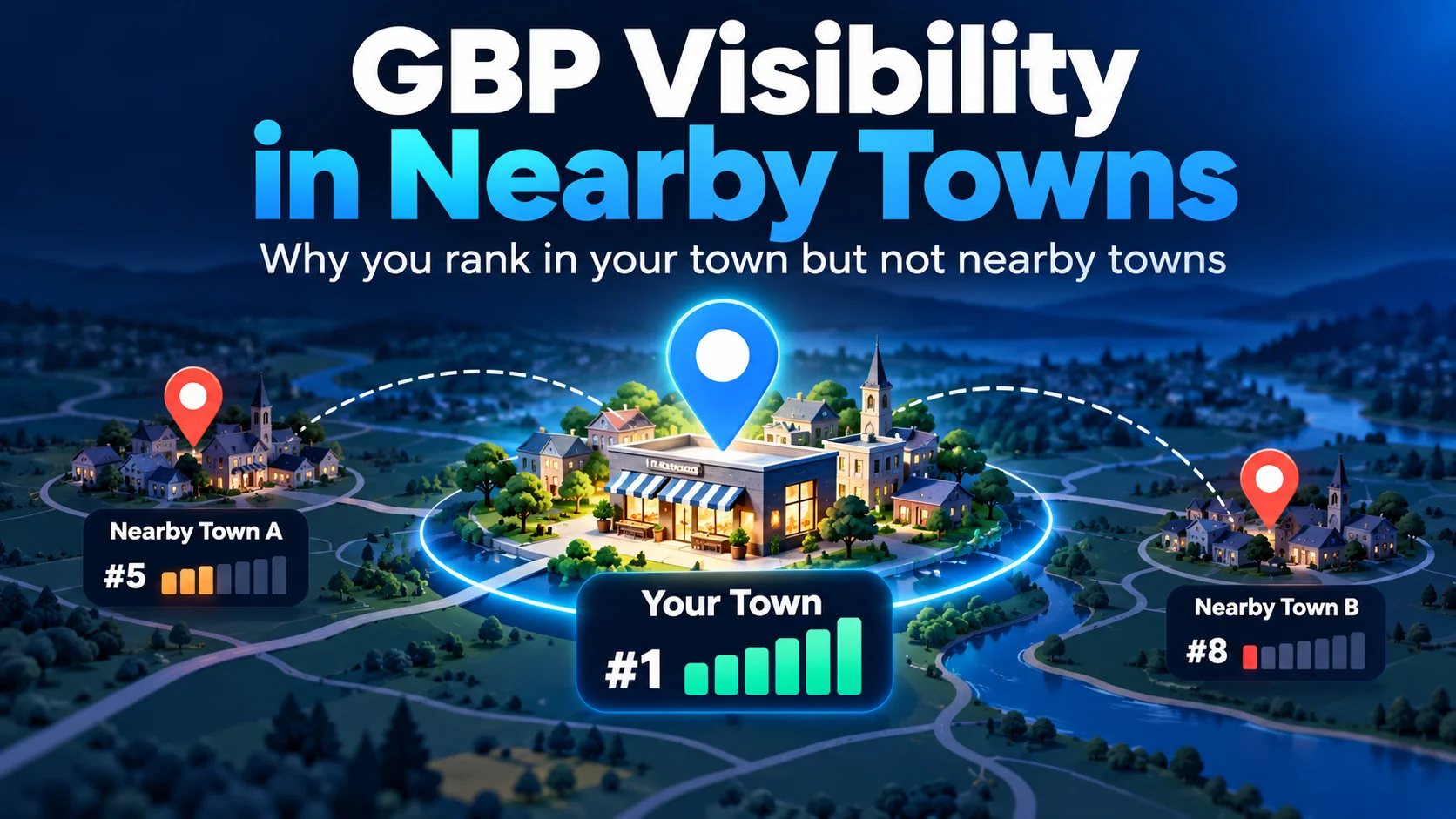
If your Google Business Profile is not ranking in nearby towns or cities but appears prominently near your real base, distance may be part of the explanation: Google considers distance from the searcher alongside relevance and prominence. Google says setting a service area “helps people find your Business Profile” and shows where you serve customers, but it does not guarantee visibility across those towns. Before changing anything, check that your profile represents the real business correctly, then compare searches made from a nearby town with searches made for that town. These tests reveal patterns to investigate, not the private weighting of Google's ranking factors.
This guide is for eligible storefront, hybrid and service-area businesses that have some local visibility already. If your profile cannot be found anywhere, or you are dealing with a suspension, that is a different investigation.
The Short Answer: Distance Matters, but It Is Not the Whole Diagnosis
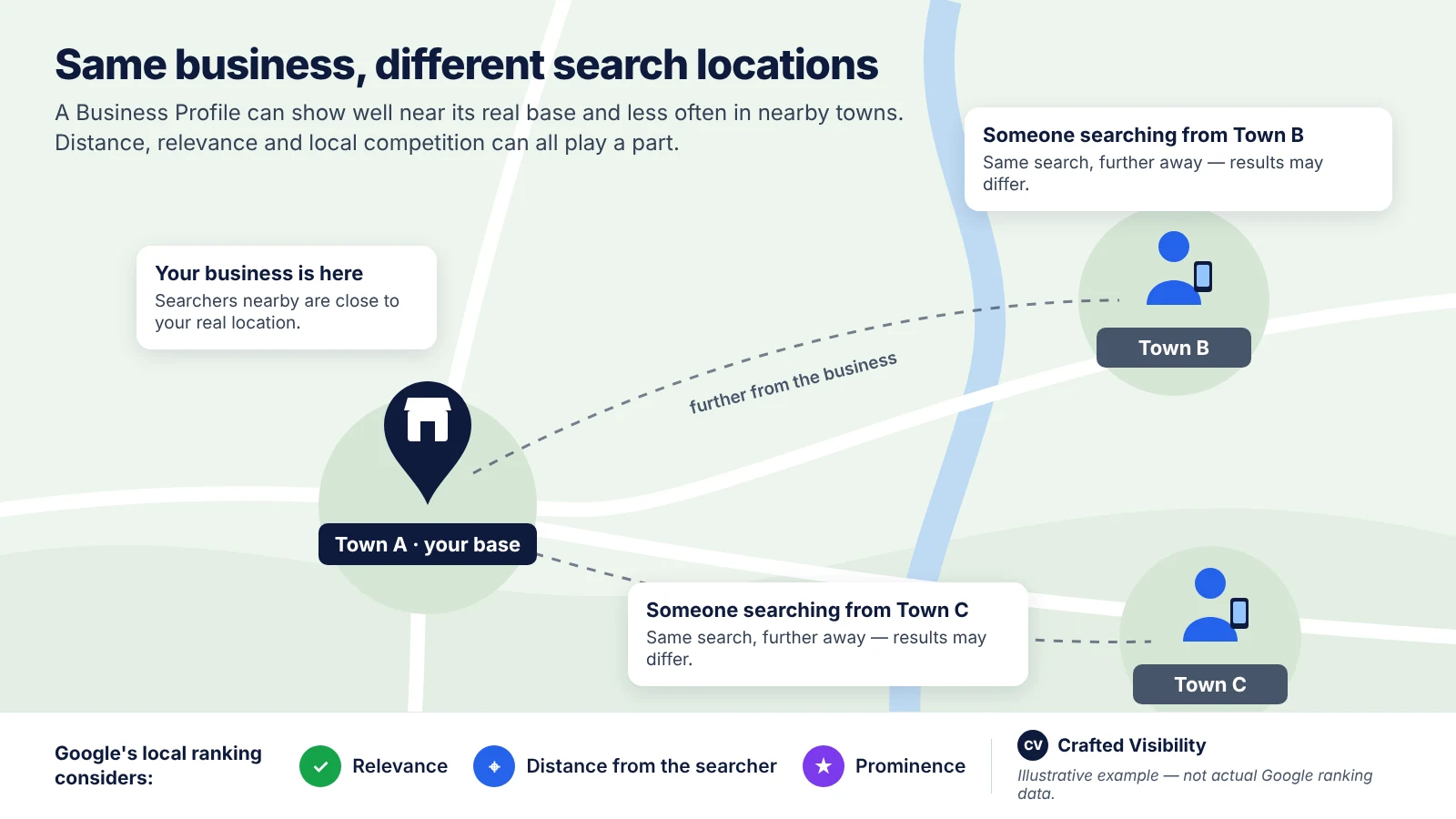
Google's local ranking guidance describes three main considerations: relevance, distance and popularity (explained on the page as prominence). Relevance concerns how well a profile matches the search. Distance is about how far the business is from the person searching. Prominence concerns how well-known the business is, with signals Google mentions including links, reviews and ratings.
That means a plumbing business based in Town A can be a strong match for a customer in Town A without appearing equally competitive to someone in Town B. Different nearby businesses may be more relevant or better known to the customer in Town B. A weaker result away from your base is not, by itself, evidence that something is wrong with your profile.
Google's service-area guidance explains what service-area settings are for: communicating where you work and helping customers discover the profile. It does not publish a rule saying every town you select becomes an additional ranking centre or receives guaranteed Maps visibility. A declared service area and the places where your business appears competitively are different things.
The useful question is therefore not simply “How do I increase my ranking radius?” It is “Which pattern can I actually observe, what might explain it, and what is safe to do next?”
First, Make Sure This Is Actually a Nearby-Town Ranking Problem
Check the correct profile and its current status
Start with the business's real name, as shown on its Business Profile. Make sure you are checking the right listing and can manage it through the Business Profile dashboard. Review any visible status or pending-edit messages before measuring nearby-town visibility.
If an exact-name search does not show the listing, do not assume it is suspended or unverified. Name ambiguity, the test location or a temporary inconsistency could also be involved. A missing branded result is a reason to check the dashboard and investigate further—not proof of a particular status problem.
Confirm the business type, real address and address visibility
The correct setup depends on how customers actually interact with your business:
- Storefront: customers can visit the real business location during its stated operating hours, and the address shown must be genuine.
- Hybrid: customers can visit the staffed premises, and the business also serves customers elsewhere. A hybrid business can display an eligible storefront address and list a genuine service area.
- Service-area business: the business travels to customers but does not serve them at its own address. Google tells these businesses to hide or remove that address from the customer-facing profile and list where they provide services.
These distinctions come from Google's business representation guidelines and service-area instructions. A hidden customer-facing address does not mean the business has no genuine underlying address for verification. Nor does hiding it establish why a particular local ranking changed.
Check the map pin before you test distance
For a business that displays its premises, check that the map pin points to the real location—not another street, the edge of town or an address used for convenience. Google provides a way to correct an inaccurate business pin when it cannot locate the address correctly.
For a service-area business with a hidden address, confirm that the private address used to represent or verify the business is genuine. Follow Google's address-visibility rules; do not expose it just to experiment with search results.
If the actual setup is wrong, correct the facts before running location comparisons. This is a sound diagnostic precaution, not proof that the wrong pin caused your previous rankings. Never move a pin towards the town you want to reach.
Separate Business Profile visibility from website organic visibility
A website page ranking for “plumber Town B” is not the same result as a Business Profile appearing in Google Maps or the Google Search local pack (sometimes called the Map Pack). These surfaces need separate observations.
If your main symptom is falling website traffic rather than weaker Maps visibility, diagnose the drop in website traffic separately. Google Search Console's ordinary web-search data should not be treated as a direct measure of the profile's Maps position.
Run Two Different Location Tests — and Do Not Mix Them Up
We call this the Crafted Visibility Nearby-Town Visibility Check. It is our practical observation framework, not an official Google test or a way to reverse-engineer the local algorithm.
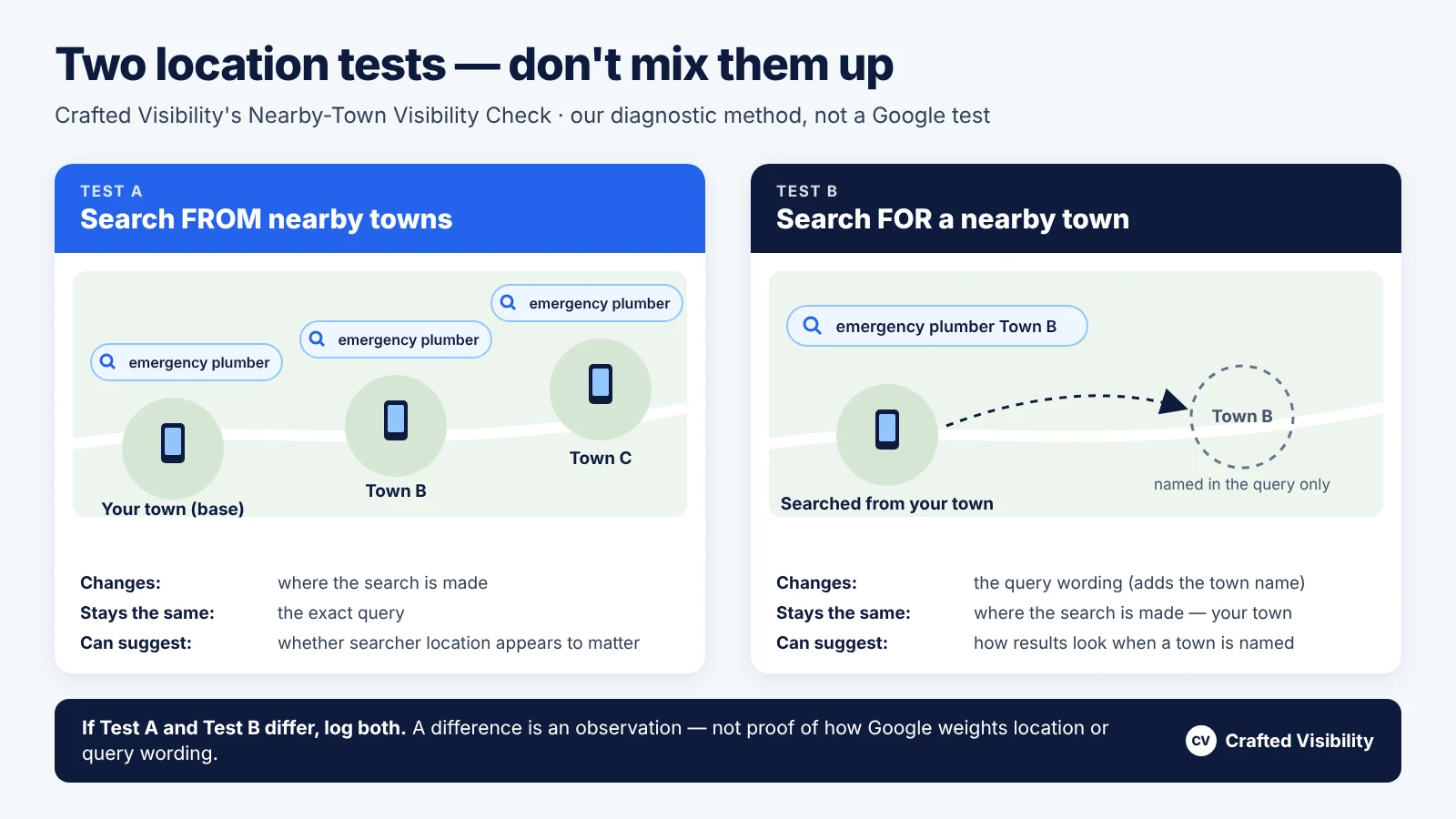
The two tests change different things. Keeping them distinct prevents an easy mistake when interpreting nearby-town searches.
Test A: Search from the nearby town using the same generic query
Choose one genuine service query, such as “emergency plumber”. First check it near your actual base in Town A. Then run the same words from a location in Town B and another in Town C. Keep the search surface and device conditions as consistent as you reasonably can.
For a non-expert business owner, practical ways to do this include:
- Visit the nearby town and search on a phone with location services enabled.
- Ask a person who is genuinely there to make the same search and send the result with the date, device and location noted.
- If you already have access to a geo-grid or location-based rank-tracking tool, document its method and limitations rather than assuming its output is identical to a live customer search. Google’s Search spam policies address automated scraping of results for rank-checking; check how any tool collects data rather than assuming its compliance or non-compliance.
- If you are confident with browser settings, use a desktop browser location override and record that method. Do not assume it perfectly recreates a search made by a person in that town.
A VPN alone is not a reliable substitute for knowing what location Google uses. Google can infer a location when a person does not share one; changing an IP address does not establish the exact location used for a result. Google defines distance in its local ranking help, but it does not prescribe this three-point testing method.
If the same query repeatedly shows your profile near its base but weakens in both neighbouring towns, geographic sensitivity is plausible. You still have not isolated distance: the competitor set, relevance and other conditions may differ across those locations.
Test B: Search for "[service] [nearby town]" from the baseline location
Return to the baseline search location. Keep that location fixed, but change the query from “emergency plumber” to “emergency plumber Town B”. Record the result separately. You may repeat the exercise with Town C.
This tests a different question: What does the result look like when the search wording includes a town? It does not recreate a customer physically searching in Town B. Google's published local-ranking help does not specify a simple weighting for the town name inside such a query.
If Test A and Test B disagree, do not conclude that Google “prefers” the town name or the searcher's location. You changed both the wording and the location between those two observations. Log what happened and use it to choose further checks—not to announce an algorithmic rule.
Record Search and Maps separately
On Google Search, you may see a local pack, ordinary web results, advertisements or Local Services Ads. In Google Maps, you see a map and its own list of businesses. Do not compare a Maps list position with presence in a Google Search local pack as if they were the same ranking.
Record sponsored placements separately. Paid results can take up screen space and change what you see without proving that the business's position in unpaid local results fell. If a local pack does not appear for a particular search, record that fact rather than marking your Business Profile as missing from Google altogether.
Build a Repeatable Visibility Baseline Before You Change Anything
Use the nearby-town observation log
Use these two connected tables as a copyable blank log. One row represents one query, one location, one surface and one occasion. Duplicate the rows for each additional day or device condition. Replace the bracketed placeholders with your own query, locations and results.
Table 1 — Test setup
| Test ID | Exact query | Search location and method | Town named in query | Search surface | Date, time and device |
|---|---|---|---|---|---|
| A1 | [service] | Base — [method] | None | [Search local pack / Maps] | [date, time, device, signed-in state] |
| A2 | [service] | Town B — [method] | None | [Search local pack / Maps] | [date, time, device, signed-in state] |
| A3 | [service] | Town C — [method] | None | [Search local pack / Maps] | [date, time, device, signed-in state] |
| B1 | [service] [Town B] | Base — [method] | Town B | [Search local pack / Maps] | [date, time, device, signed-in state] |
Table 2 — What you observed
| Test ID | Profile visibility | Ads/LSAs? | Businesses seen instead | Profile changes since last test? | Repeat result | Pattern confidence |
|---|---|---|---|---|---|---|
| A1 | [state and check scope] | [yes/no] | [names or none] | [none / actual correction] | [not repeated / same / different] | [low / moderate / stronger] |
| A2 | [state and check scope] | [yes/no] | [names or none] | [none / actual correction] | [not repeated / same / different] | [low / moderate / stronger] |
| A3 | [state and check scope] | [yes/no] | [names or none] | [none / actual correction] | [not repeated / same / different] | [low / moderate / stronger] |
| B1 | [state and check scope] | [yes/no] | [names or none] | [none / actual correction] | [not repeated / same / different] | [low / moderate / stronger] |
Use the following surface-specific visibility states consistently:
- Google Search local pack: (1) pack shown and your profile included; (2) pack shown but your profile not included; or (3) no local pack displayed. State 3 is not evidence that the profile is missing from Google Maps.
- Google Maps list: (1) profile observed at an approximate position within the results you actually checked; or (2) profile not observed within a declared range, such as the first 20 listings inspected. Always state how many listings you checked. Not finding it in that range does not mean the profile is absent everywhere.
The log's confidence column describes how consistently you observed the pattern, not how confidently you identified its cause. A single search is low-confidence evidence.
Repeat three locations across two separate days
As a practical starting point, compare the baseline location plus two nearby-town locations—three in total—on two separate days. Keep the query, location method, surface and device context as similar as possible. Repeat the town-modified query as a separate experiment.
This is our editorial rule of thumb, not a Google requirement or a statistically validated threshold. More observations might be needed if the results vary, and even a stable pattern does not identify a ranking factor with certainty.
Know when to stop testing
Stop repeating the same checks once your observations are consistent enough to choose the next diagnostic branch. If the pattern changes between repeats, label it unconfirmed rather than forcing a conclusion. If results are stable and acceptable across nearby towns, there may be nothing to fix.
Most importantly, your business name, real address, map pin, address visibility and declared service areas must never become experimental ranking switches. Correct them when they are inaccurate or the business genuinely changes—not to see whether a ranking graph moves.
Diagnose What the Pattern Actually Supports
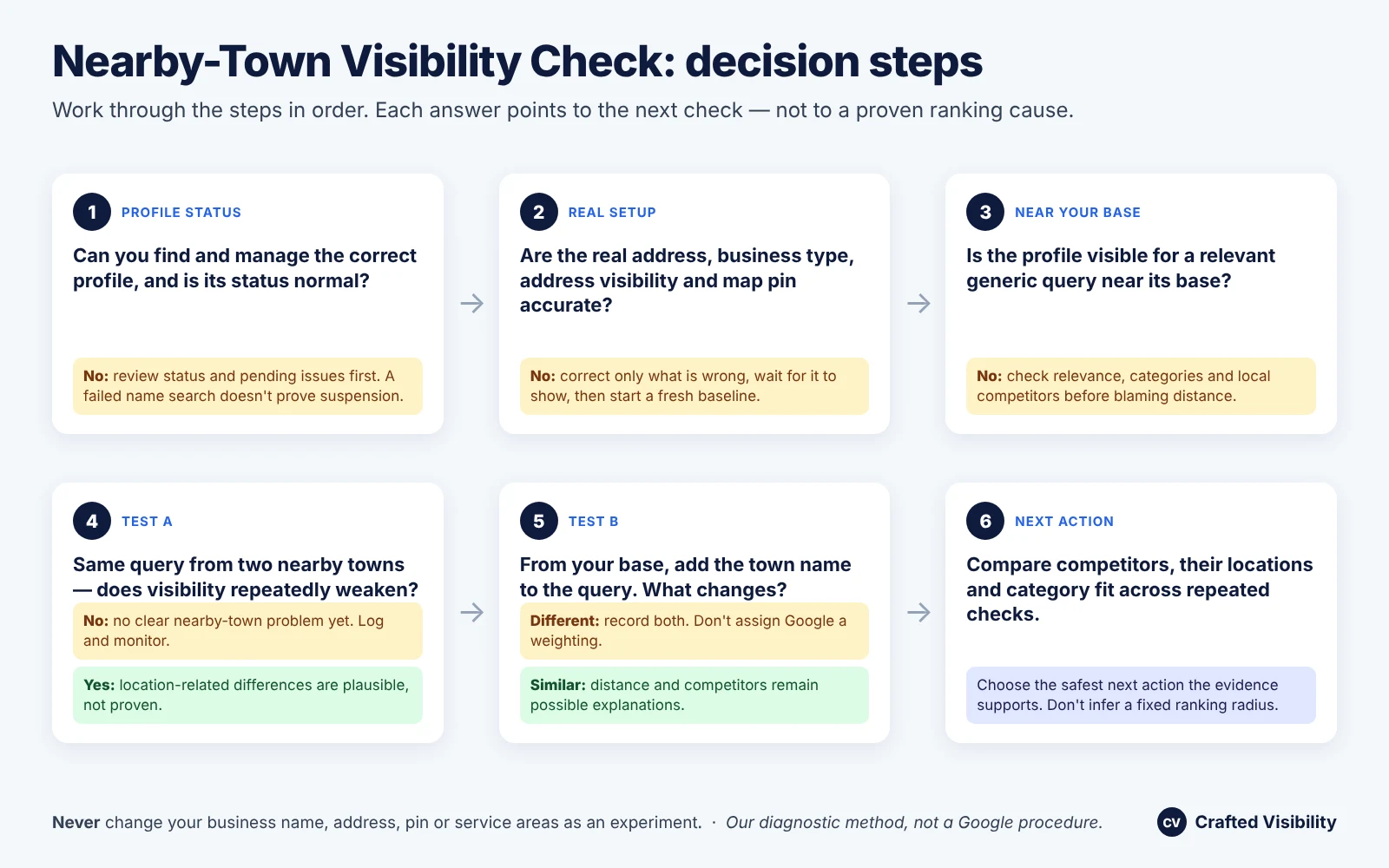
Use the steps below to choose a plausible explanation before changing any settings. They deliberately separate what happened from why it may have happened.
Nearby-Town Visibility Check: decision steps
- Can you find and manage the correct profile, and is its dashboard status normal?
- No: review status and pending issues first. A failed name search does not prove suspension.
- Yes: continue.
- Are the real address, eligible business model, address visibility and pin accurate?
- No: correct only inaccurate business information, allow time for the change to appear, then establish a fresh baseline.
- Yes: continue.
- Is the profile visible for a relevant generic query near its base?
- No: investigate basic relevance, categories, accuracy and local competitors before blaming distance.
- Yes: continue.
- Test A: does the same generic query repeatedly weaken in the two nearby towns?
- No: do not assume there is a geographic visibility problem; log and monitor.
- Yes: distance or other location-dependent differences are plausible, not proven causes.
- Test B: what happens when you add the town name to the query from the baseline location?
- Different result: record the distinction; do not assign Google a weighting.
- Similar result: distance and the competitor environment remain possible explanations, not a diagnosis.
- Compare relevant competitors, their apparent locations and service/category fit. Use the repeated log and the table below to choose a safe next action. Do not infer a precise ranking radius.
Diagnostic matrix
How to read the evidence: Google confirms means the point is documented in Google’s own guidance; Practitioner tests suggest refers to limited independent observations; Our interpretation is a practical reading of the pattern; and Not established means the evidence does not support a firm conclusion — the final column lists those limits for each pattern. A row may identify both an official rule and an interpretation, without claiming that Google endorses the interpretation.
| Observed pattern | Plausible explanation | Evidence level | Check next | What you cannot conclude yet |
|---|---|---|---|---|
| Hard to find by business name | Status, naming or test-context issue | Our interpretation | Check the correct profile and dashboard | That the business is suspended or unverified |
| Incorrect real address, pin or visibility setting | Representation or accuracy problem | Google confirms; Our interpretation | Correct factual errors before testing | That the error caused the whole ranking pattern |
| Same generic query weakens away from base | Distance, competition or relevance may differ | Google confirms; Our interpretation | Repeat Test A and compare competitors | That distance alone caused it or there is a fixed radius |
| Test A and town-named Test B differ | Two search conditions gave different results | Our interpretation | Keep logs separate; repeat | How Google weights the location term |
| Town listed as service area but weak there | Area served is not guaranteed ranking coverage | Google confirms; Practitioner tests suggest | Check service accuracy and actual local competitors | That the service area guarantees rank or has zero effect of any kind |
| Hidden-address business shows unusual results | Underlying real location and other factors may matter | Google confirms; Practitioner tests suggest | Check genuine base and correct hidden-address setup | That hiding the address caused the change |
| Results vary across days or devices | Context, layout or volatility | Our interpretation | Repeat under like-for-like conditions | That a single fluctuation is a lasting ranking change |
| Profile seems missing in Search but present in Maps | Different surfaces or paid modules | Our interpretation | Record local pack, Maps and ads separately | That screen position proves a local ranking loss |
| “Near me” differs from town-name query | Search terms or locations differ | Our interpretation | Treat as a separate query type | That the queries work identically |
| Organic town page ranks, Maps profile is weak | Organic and local visibility are distinct | Our interpretation | Review the website page separately | That adding a town page will lift Maps position |
| Postal town/postcode differs from a locality label | Different geographic labels or boundaries | Our interpretation | Record the exact test point and label | That a mismatch means Google has suppressed the profile |
When searcher location appears to matter
If Test A shows a repeatable drop as the test location moves away, distance is a candidate because Google explicitly includes it in local ranking. But you have not held the competitor environment constant. Nearby businesses and their apparent relevance may change at the same time.
Treat “searcher location appears to matter” as a reason to examine the competing results in Town B—not as permission to move your address or invent a branch there.
When local competitors appear stronger
Look at the businesses appearing ahead of yours for the same service query in the nearby town. Are they more clearly associated with that service? Do they have different business categories, relevant details or stronger apparent prominence? These are questions to investigate, not a checklist that proves which factor won.
Google says complete, accurate information can help a relevant profile appear, and it discusses links, reviews and ratings in connection with prominence. That does not mean any one review or link will overcome distance, and Google does not disclose precise factor weights. See its local ranking explanation.
Why your service-area list is not a ranking map
Google lets eligible businesses define genuine service areas using places such as towns and postcodes, rather than drawing a radius. Its service-area instructions allow up to 20 listed areas and give a general guideline of about two hours' driving distance from the base; Google's representation guidelines note that larger areas may suit some businesses. That is configuration guidance, not a published two-hour ranking radius.
Google explicitly says service areas help people find the profile and show where a business provides services. Listing the surrounding areas and nearby cities you genuinely cover describes real coverage, not a new proximity point. Google does not document an algorithmic rule under which each added town becomes a new base for local ranking.
Limited practitioner tests offer context, not certainty. In a Whitespark test published in October 2024, Darren Shaw changed service-area settings on one profile during two short periods in May–June 2024 and observed no ranking improvement. There was no control profile, and the author noted that Google may change how this works. Sterling Sky's service-area discussion describes older observations pointing in a similar direction, but its displayed page date should not be mistaken for the age of its underlying evidence.
The practical decision remains straightforward: list the towns you genuinely serve, but do not use that list as a map of where you expect to rank.
What a hidden address can and cannot tell you
A service-area business operating from a residential or other non-customer-facing base should follow Google's rule to hide the address customers do not visit. Google's business guidelines and address help, linked above, explain the distinction. Its verified real address is not the same thing as a public storefront.
Sterling Sky’s discussion of service-area rankings suggests that the underlying verification address can matter to where a profile appears. That is older practitioner interpretation, not a Google-documented ranking rule. In a separate small Sterling Sky case, rankings declined after an address was hidden and returned once it was shown again. This sequence does not establish that address visibility alone caused the changes; it was not a controlled experiment. It does not justify displaying a home address where customers are not served. Google’s representation policy takes precedence.
Check "near me", town labels and changing result layouts carefully
“Near me”, “plumber Town B” and “plumber” are not interchangeable queries. Keep each in a separate log row. Do not infer Google's treatment of those words from a single comparison.
Likewise, postal towns, districts, postcodes (ZIP codes in the US), everyday place names and the locality labels shown on Maps do not always align. Record the actual test point and the label shown. A boundary or label difference is an observation to investigate, not proof of a Google ranking penalty.
Finally, note advertisements and Local Services Ads above or around local results. A changed page layout can make a profile harder to notice without demonstrating an equivalent change in its position within unpaid local results.
What You Can Change Safely — and What You Should Not
Correct inaccurate profile information
Correct what is genuinely wrong: the recognised business name, a fitting primary category, real address or pin, correct address-visibility setting, relevant services and the towns you truly serve. Google's Business Profile guidelines prioritise accurate real-world representation.
Make factual corrections because they are true, not because an uncontrolled search seemed to improve after an edit. Re-establish a baseline after a legitimate change and give the updated information time to appear.
Strengthen legitimate relevance and prominence signals
Explain your services accurately on your website and profile. Keep business details current. Invite real customers to leave honest reviews without incentives, pressure, screening for positive feedback or instructions about what to write. Develop relevant mentions and links through real business activity, not artificial schemes.
Google's ranking guidance supports relevance, accurate details, reviews, ratings and links as meaningful considerations. It does not promise a particular improvement for any individual action or town.
Use location pages for genuine organic value, not as a Maps shortcut
A useful page about work in Town B can help people searching the web decide whether your business serves them. It should answer real local questions with genuinely relevant information: services available, coverage constraints and details that make the page meaningfully different from another town page.
A location page is not a replacement ranking base for your Business Profile. Publishing near-identical pages with only town names changed, all funnelled to the same destination, may fall under Google's doorway-abuse spam policy.
For genuinely useful pages, plan useful location and service pages rather than automatically creating one for every place on a map.
Avoid location and review tactics that create policy risk
Do not try to manufacture proximity. These actions are either contrary to Google guidance or are unsafe experiments unsupported by the evidence. The location and profile rules below draw on Google's business representation guidelines and the address and service-area guidance cited above. Review restrictions and doorway-page warnings are supported by their respective policies cited in this guide. Precautions about repeated testing are our editorial advice, not additional Google rules.
| Do not do this | Why it is a problem |
|---|---|
| Use fake addresses, remote mailboxes or ineligible virtual offices | Business Profiles must reflect real, eligible business locations. Google's guidelines distinguish legitimate premises from ineligible arrangements. |
| Create duplicate profiles for towns you merely serve | A service area is not permission to create extra listings. Genuinely separate, eligible staffed locations have their own rules. |
| Shift the map pin towards another town | A pin is for the actual business location, not a ranking experiment. |
| Reveal a home address where customers are not served | Follow Google's hidden-address requirements for service-area businesses. |
| Toggle address visibility repeatedly to test rankings | Small practitioner observations do not override representation requirements. |
| Add town keywords to your business name | The profile name should reflect the real-world name, not a search phrase. |
| Offer rewards for reviews or invite only expected positive reviewers | Google's Maps contributions policy prohibits incentives and selective positive-review solicitation. |
| Tell customers to write particular town names in reviews | Asking customers to mention particular towns turns a review into a scripted message. Ask for honest, freely written feedback instead. |
| Add towns you do not serve just to extend your supposed radius | Google's service-area guidance asks for an accurate representation of coverage; it does not establish a ranking radius. |
| Publish near-identical pages for every surrounding town | Thin regional pages created to funnel people may constitute doorway abuse under Google's Search spam policies. |
What to Do Next Once You Know Which Branch You Are In
If the problem is profile setup or eligibility
If your log points to incorrect business details, an inaccurate pin, an address-visibility concern or a status issue, resolve the factual setup first. If you need help understanding the configuration and compliance requirements, you can review your Google Business Profile setup.
You may discover that fixing an error is necessary without having any reliable evidence that it will expand your local visibility. Those are different outcomes.
If the problem is wider local-market relevance and authority
If the profile is accurate and the repeated checks consistently show stronger competing businesses in neighbouring towns, the next step may involve your wider business and website presence. That can include a local SEO strategy for nearby markets, provided it addresses genuine demand and does not rely on mass-produced town pages.
Still unsure which branch you're in? Keep your Nearby-Town Visibility Check log, including the searches where you didn't appear and the exact conditions you tested. Contact Crafted Visibility and summarise the pattern in your enquiry. We can help assess what your observations support, what remains uncertain and whether anything needs changing—without promising visibility in every town you serve.